
TL;DR
Email verification is a multi-step technical process that confirms whether an email address is real, properly formatted, and capable of receiving messages. It checks syntax, DNS records, MX servers, and mailbox existence through an SMTP handshake, all without sending an actual email. Businesses that skip verification risk high bounce rates, damaged sender reputation, and wasted ESP costs. Jump to the 7-step process breakdown or the getting started guide.
If you manage an email list of any size, you have probably dealt with bounced messages, spam folder placement, or open rates that keep dropping. The cause is almost always the same: unverified addresses piling up in your database.
This article covers what email verification actually means, how it differs from validation and authentication, and what happens during each of the seven technical steps that run when a tool like BounceKo checks an address. For an end-to-end look at email hygiene, see our complete email verification guide.
Key takeaways:
- Email verification confirms that an address exists and can receive mail through a 7-step process, without sending any message to the recipient
- Email lists lose 22-28% of valid addresses annually through natural decay, making regular verification essential
- A bounce rate above 2% is the industry threshold for ISP penalties, and Google requires spam complaint rates below 0.3%
- Email verification and email authentication (SPF/DKIM/DMARC) solve different problems; both matter for deliverability
- Try BounceKo free with 100 verification credits
What Is Email Verification?
Email verification is a multi-step technical process that confirms whether an email address is real, properly formatted, and capable of receiving messages. It works by checking the address against formatting standards, querying DNS and MX records, and simulating a mail server handshake to confirm the mailbox exists. The entire process runs without delivering any message to the recipient.
Every email address has a limited lifespan. People change jobs, switch providers, abandon accounts, and let domains expire. According to ZeroBounce's Email List Decay Report, email databases lose roughly 22-28% of their deliverable contacts each year. Verification catches these dead addresses before they damage your campaigns.
You may also see the process called "email checking," "email address verification," or simply "email verification." The underlying technology is the same. Tools like BounceKo perform the full verification pipeline automatically: you upload a list or submit an address through the API, and the system returns a result code for each entry. Across the millions of addresses BounceKo has processed, roughly one in four comes back as invalid, risky, or undeliverable, which says a lot about why skipping verification is a bad idea.
Email Verification vs Email Validation: What Is the Difference?
Email validation checks whether an address is formatted correctly according to RFC 5322 standards: a valid local part, an @ symbol, and a properly structured domain name. Email verification goes further by confirming the mailbox actually exists on the receiving server through DNS lookups, MX record checks, and an SMTP handshake. Validation catches formatting errors; verification catches non-existent mailboxes.
The address user@@gmail.com fails validation because the double @ symbol violates RFC formatting rules. The address user@gmail.com passes validation (the syntax is correct) but might fail verification if that specific mailbox has never been created. A typo like user@gmial.com may pass basic syntax validation but will fail verification at the DNS step because that domain has no mail server.
| Email Validation | Email Verification | |
|---|---|---|
| What it checks | Formatting rules (RFC 5322): @ symbol, domain structure, illegal characters | Mailbox existence: DNS records, MX servers, SMTP handshake confirmation |
| Network required | No. Runs locally against syntax rules | Yes. Queries DNS servers and connects to mail servers |
| Speed | Instant (no network requests) | 1-5 seconds per address (network-dependent) |
| Example | user@@gmail.com fails: double @ symbol violates RFC formatting rules |
user@gmail.com may fail: syntax is correct but mailbox does not exist |
| What it catches | Double @ symbols, missing @ symbols, invalid characters, malformed domains | Non-existent mailboxes, expired domains, disposable addresses, spam traps |
The two terms get used interchangeably in most marketing contexts. Email verification means confirming that an address is real, active, and able to receive mail. Most tools, including BounceKo, run both validation and verification as one process. When someone says "verify your email list," they almost always mean the full pipeline. Our email verification guide covers both processes in more detail.
How Does Email Verification Work? The 7-Step Process
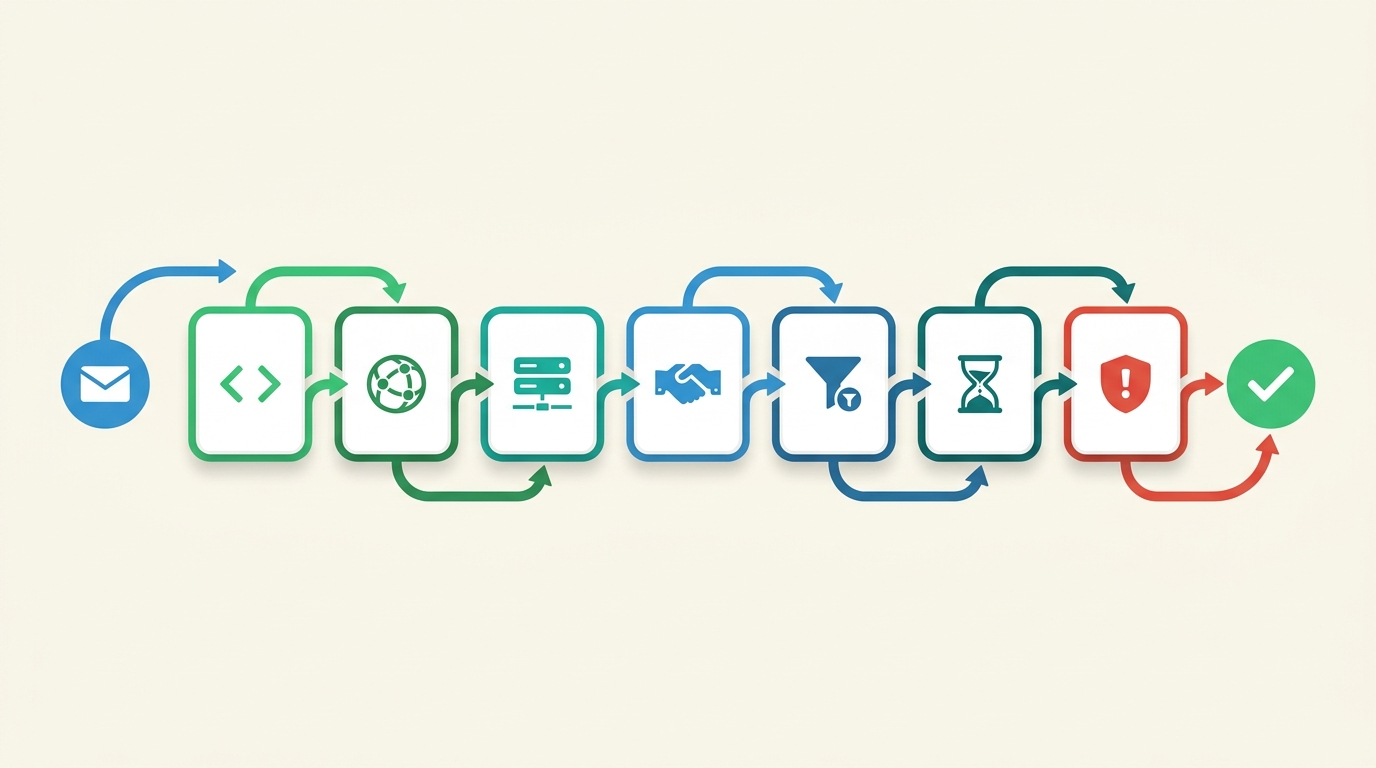
Email verification works through a seven-step pipeline that checks each address from basic formatting to live mailbox confirmation. It validates syntax, queries DNS records, looks up MX servers, simulates an SMTP handshake, detects catch-all servers, identifies disposable addresses, and screens for spam traps. None of the seven steps sends an email to the address being checked.
Step 1: Syntax Validation (RFC 5321/5322)
The first check examines whether the address follows the formatting rules defined in RFC 5322. It looks for a valid local part (the text before the @ symbol), the @ symbol itself, and a properly structured domain name after it. Addresses with spaces, double dots, missing @ symbols, or illegal characters are rejected immediately. This step is fast because it requires no network requests.
Step 2: DNS and Domain Check
After confirming the syntax, the verification tool extracts the domain portion (everything after the @) and queries the Domain Name System. If the domain does not resolve, meaning it has no DNS records at all, the address is invalid. This step catches expired domains, typo domains like "gmial.com," and entirely fictional domains that never existed.
Step 3: MX Record Lookup
The tool queries the domain's Mail Exchange (MX) records to confirm that a mail server is configured to receive email for that domain. A domain can have valid DNS records for a website while having no MX records for email. Some domains rely on A records as a fallback for mail delivery; more thorough verification tools like BounceKo check both MX and A records.
Step 4: SMTP Handshake Simulation
This step is the most technically involved. The tool connects to the mail server identified by the MX records and initiates an SMTP conversation following the protocol defined in RFC 5321. It issues an EHLO command to identify itself, a MAIL FROM command to specify a sender, and a RCPT TO command with the target address. The server responds with a status code: 250 means the mailbox exists, while 550 means it does not. The connection is then closed before the DATA stage, so no message is ever transmitted.
Some mail servers use greylisting, which temporarily rejects the first connection attempt from an unknown sender. Professional verification tools handle this by retrying after the greylisting delay to get an accurate result.
Step 5: Catch-All Server Detection
Catch-all servers are configured to accept email for any address at their domain, regardless of whether the specific mailbox exists. The verification tool detects this by testing with a randomly generated address that almost certainly does not exist. If the server accepts it, the domain is flagged as catch-all. Individual mailbox verification is unreliable for catch-all domains because the server says "yes" to everything. BounceKo flags these addresses distinctly so you can make informed decisions about whether to keep or remove them.
Step 6: Disposable Email Identification
Disposable email services like Guerrilla Mail, Temp Mail, and Mailinator let users generate temporary addresses that self-destruct within hours or days. These addresses are technically valid at the moment of verification, but they will become undeliverable shortly after. Verification tools maintain databases of 3,000 or more known disposable domains and flag any address that matches. Removing disposable addresses before they decay prevents unnecessary bounces.
Step 7: Spam Trap and Role-Based Address Screening
The final step screens for addresses that pose a risk to your sender reputation. Spam traps are email addresses operated by ISPs and anti-spam organisations like Spamhaus to identify senders with poor list hygiene. Hitting a single spam trap can trigger blocklisting for your entire sending domain. Role-based addresses (info@, admin@, sales@, support@) are shared mailboxes that typically have lower engagement rates and higher complaint rates. BounceKo screens for both categories and returns clear result codes so you can filter them from your active sending list.
Key Terms Glossary
- DNS (Domain Name System): The internet's address book. It translates domain names like gmail.com into IP addresses that computers use to locate servers.
- MX Record (Mail Exchange Record): A DNS record that specifies which mail server handles email for a given domain. Without an MX record, a domain cannot receive email.
- SMTP (Simple Mail Transfer Protocol): The standard protocol mail servers use to send, receive, and relay email. Verification tools use SMTP commands to ask a server whether a mailbox exists.
- RFC (Request for Comments): Published standards that define how internet protocols work. RFC 5321 covers SMTP, and RFC 5322 covers email message formatting.
- Catch-all server: A mail server configured to accept email for any address at its domain, whether or not the specific mailbox exists. Individual mailbox verification is unreliable on catch-all domains.
- Greylisting: A spam filtering technique where a mail server temporarily rejects the first connection from an unknown sender. Legitimate senders retry; spammers typically do not.
- Spam trap: An email address operated by ISPs or anti-spam organisations to catch senders with poor list hygiene. Sending to a spam trap can trigger blocklisting for your entire domain.
- Role-based address: A shared mailbox tied to a function rather than a person (e.g. info@, admin@, sales@). These addresses tend to have lower engagement and higher complaint rates.
Types of Email Verification
There are three main types of email verification: bulk list verification (uploading an entire list for batch processing), real-time API verification (checking individual addresses at the point of capture), and single-address checks (entering one address at a time through a web interface). Most businesses use a combination of bulk and API verification to cover both existing lists and new sign-ups.
Bulk list verification
Bulk verification lets you upload a CSV, TXT, or Excel file containing thousands or millions of email addresses and process them all at once. This is the most common approach for cleaning an existing subscriber database. You upload the file, the tool runs all seven verification steps on every address, and you download a results file showing which addresses are valid, invalid, risky, or unknown. For a step-by-step walkthrough of the cleaning process, see our guide on how to clean your email list.
Real-time API verification
API verification checks individual addresses at the moment they are entered, typically on sign-up forms, checkout pages, or lead capture widgets. The API call returns a result within 1-3 seconds, allowing you to reject invalid addresses before they enter your database. This approach prevents bad data from accumulating in the first place, which reduces the need for bulk cleaning later. BounceKo's API supports real-time verification with response times fast enough for inline form validation. Common integrations include WordPress registration forms, Shopify checkout flows, and custom applications built with standard REST API calls. Each API response returns a structured JSON result with the verification status, risk level, and reason code, so you can build conditional logic around the outcome.
Single-address verification
Single-address verification is a manual check through a web interface. You enter one address, click verify, and get an instant result. This is useful for spot-checking individual contacts, verifying a lead before a sales call, or testing addresses that bounced in a recent campaign. It is not practical for large-scale list cleaning, but it fills a gap for quick, ad hoc checks.
Industry practitioners broadly agree that catching bad addresses at the point of entry is more cost-effective than cleaning a list after the fact. Periodic bulk cleaning still matters for addressing natural decay, but real-time verification at sign-up prevents the majority of invalid addresses from ever reaching your database.
How long does email verification take? Speed depends on the method. Single-address checks return results in 1-5 seconds. API verification responds in 1-3 seconds per address, fast enough for real-time form validation. Bulk list processing scales with list size: 10,000 addresses typically complete in under 10 minutes, while 100,000 addresses take roughly 30-60 minutes. BounceKo processes bulk lists at a rate of up to 100,000 verifications per hour.
Why Do Businesses Need Email Verification?
Businesses need email verification because email lists degrade steadily over time. ZeroBounce's data shows that 22-28% of addresses become undeliverable every year through job changes, abandoned accounts, and provider shutdowns. Sending to these dead addresses triggers bounces that damage sender reputation, reduce inbox placement, waste ESP costs, and distort campaign analytics. Regular verification prevents all four problems.
Sender reputation protection
ISPs like Gmail, Outlook, and Yahoo evaluate your sending behaviour to decide whether your messages belong in the inbox or the spam folder. Bounce rates, complaint rates, and spam trap hits all factor into your sender reputation score. Validity's Sender Score rates senders on a 0-100 scale; scores below 70 result in significantly reduced inbox placement. Every bounced email pushes your score downward. Verification removes the addresses that would generate those bounces.
Industry groups like the Messaging, Malware, and Mobile Anti-Abuse Working Group (M3AAWG) consistently emphasise that list hygiene is one of the most controllable factors in deliverability. ISP filtering algorithms are a black box, but list quality is entirely within your control. Verification is the most direct way to manage it.
Deliverability experts like Laura Atkins of Word to the Wise have written extensively about treating list hygiene as an ongoing operational discipline. The core argument is straightforward: reputation damage from sending to invalid addresses accumulates quickly, and rebuilding a damaged sender reputation takes far longer than maintaining a clean list in the first place.
Deliverability and inbox placement
Validity's 2025 Email Deliverability Benchmark found that one in six legitimate marketing emails never reaches the inbox, with a global average inbox placement rate of around 83%. Senders who maintain clean, verified lists routinely exceed 95% inbox placement. That gap between a clean list and a neglected one often shows up as the difference between consistent inbox delivery and watching your open rates slide. For more on how list verification impacts deliverability, see our dedicated guide.
ESP cost savings
Most email service providers charge based on the number of contacts in your database or the volume of emails you send. If 25% of your list consists of invalid addresses, you are paying to store and send to contacts who will never open your messages. For a 200,000-contact database with 25% decay, that means 50,000 dead addresses costing an estimated $80-100 per month in wasted ESP fees alone. Removing them with verification is an immediate cost reduction. Check BounceKo's pricing, where credit packages start at $19 for 10,000 verifications and credits never expire.
Campaign analytics accuracy
Invalid addresses inflate the denominator of every email metric you track. Your open rate, click rate, and conversion rate all appear lower than they actually are because you are dividing by a list that includes addresses that will never register an open or click. That distortion bleeds into your A/B tests, segmentation, and revenue forecasts. Clean your list, and your numbers suddenly make more sense.
Real-world impact
A mid-size e-commerce company with 45,000 subscribers ran their list through BounceKo for the first time and found that 16% of addresses (roughly 7,200) were invalid, risky, or tied to disposable domains. Before verification, their bounce rate hovered around 4.1%, well above the 2% ISP threshold. After removing flagged addresses, their bounce rate dropped to 0.3%, inbox placement improved by over 20%, and their next campaign saw noticeably higher open rates, mostly because more messages were actually reaching the inbox.
A SaaS company running outbound sales campaigns had built a prospect list of 12,000 addresses over two years from a mix of lead databases and manual research. After running the list through BounceKo, 23% of addresses came back as invalid or risky: expired company domains, role-based addresses that nobody monitored, and contacts who had changed jobs. Cleaning the list dropped their bounce rate from 5.8% to 0.4% and improved reply rates because their messages were consistently reaching inboxes rather than bouncing or landing in spam.
Email verification trends in 2026
The need for email verification has intensified in 2026. Google and Yahoo began enforcing stricter bulk sender requirements in early 2024, and those policies have tightened further since. Senders who do not authenticate their domains or who let spam complaint rates exceed 0.3% now face automatic spam filtering or outright rejection. These changes have made verification a baseline requirement rather than an optional best practice.
API-based real-time verification has seen the fastest growth as businesses shift from periodic list cleaning to continuous data quality. Instead of uploading a file once a quarter, companies are integrating verification directly into sign-up forms, CRM workflows, and marketing automation platforms. This shift from reactive to proactive verification reduces the volume of invalid addresses that accumulate between cleaning cycles.
AI-assisted verification is also emerging as a category. Some tools now use machine learning models to predict whether an address is likely to become invalid based on domain reputation patterns, historical bounce data, and behavioural signals. While traditional SMTP-based checks remain the foundation, predictive layers add an extra dimension of risk scoring that helps senders make better decisions about borderline addresses.
What Happens When You Send Email to an Unverified List?
Sending to an unverified email list causes real damage: high bounce rates, lower sender reputation, reduced inbox placement across your entire list, wasted ESP budget, and potential account suspension. If your list contains recycled spam traps operated by ISPs and organisations like Spamhaus, a single send can trigger domain blocklisting.
The damage compounds over time. Your first send to an unverified list generates bounces. ISPs record those bounces and lower your sender reputation. On the next send, more of your messages go to spam. Engagement drops because fewer people see your emails. The ESP detects the rising bounce rate and may throttle your sends or flag your account. Google's Bulk Sender Guidelines require spam complaint rates below 0.3%, and major ESPs like Mailchimp and HubSpot will suspend accounts with persistent high bounce rates.
| Consequence | What Happens | How Verification Prevents It |
|---|---|---|
| High bounce rate | Emails to invalid addresses are returned as undeliverable, pushing your bounce rate above the 2% threshold | Removes invalid addresses before you send |
| Reputation damage | ISPs lower your sender score, reducing inbox placement for all future sends | Keeps bounce rate low, protecting your score |
| Spam folder placement | Messages to valid subscribers land in spam instead of the inbox | Maintains the reputation needed for inbox delivery |
| Blocklisting | Hitting a spam trap can get your domain added to blocklists like Spamhaus | Screens for known spam traps and removes them |
| ESP account suspension | Persistent high bounces prompt your ESP to freeze or close your account | Eliminates the bounces that trigger ESP intervention |
| Wasted budget | You pay ESP fees for contacts that will never read your messages | Removes dead weight so you only pay for active contacts |
Verifying your list before a campaign costs far less than dealing with the fallout of sending to an unverified one. For a detailed look at how list quality degrades over time, see our article on how to stop email list decay.
Is Email Verification the Same as Email Authentication (SPF/DKIM/DMARC)?
No. Email verification and email authentication are different processes that solve different problems. Verification confirms that an email address exists and can receive mail. Authentication (SPF, DKIM, DMARC) confirms that an email message is legitimately sent from the domain it claims to come from. Both are necessary for healthy email deliverability, but they are not interchangeable.
SPF (Sender Policy Framework) publishes a DNS record listing which IP addresses are authorised to send email on behalf of your domain. DKIM (DomainKeys Identified Mail) adds a cryptographic signature to outgoing messages so receiving servers can verify the message was not altered in transit. DMARC (Domain-based Message Authentication, Reporting, and Conformance) ties SPF and DKIM together with a policy that tells receivers what to do if authentication fails. You can learn more about these protocols at dmarc.org.
Think of it this way: authentication proves you are who you say you are when you send a message. Verification proves the person you are writing to actually exists. A sender with perfect SPF, DKIM, and DMARC records will still get penalised if they send to a list full of invalid addresses. Conversely, a verified list will not protect you from spoofing if you have not set up authentication. You need both. Our email verification guide covers how verification fits alongside authentication in a complete deliverability strategy.
How Can You Verify an Email Address Without Sending a Message?
Email verification tools check whether an address is real without sending any message to the recipient. The process uses an SMTP handshake where the tool connects to the receiving mail server, issues a series of protocol commands to ask if the mailbox exists, and then closes the connection before transmitting any content. The recipient never receives anything and has no way of knowing the check occurred.
The SMTP handshake follows a specific sequence. The verification tool connects to the mail server and sends an EHLO command to identify itself. It then sends a MAIL FROM command to specify a return address, followed by a RCPT TO command containing the email address being checked. The receiving server responds with a status code: a 250 response means the mailbox exists and is accepting mail, while a 550 response means the mailbox does not exist. At this point, the tool sends a QUIT command and closes the connection. The DATA command that would transmit an actual message is never issued.
How email verification works without sending:
- Connect: The tool opens a connection to the recipient's mail server using the MX record
- Identify: It sends EHLO and MAIL FROM commands per the SMTP protocol
- Ask: It sends RCPT TO with the target address; the server replies 250 (exists) or 550 (does not exist)
- Disconnect: The tool sends QUIT and closes the connection. No message is ever transmitted
There are scenarios where SMTP-based verification has inherent limitations. Catch-all servers accept all RCPT TO commands whether the mailbox exists or not, so individual mailbox confirmation is impossible for those domains. Greylisting servers temporarily reject the first connection from an unknown sender, so verification tools have to retry after a delay. Verification also cannot determine whether a mailbox is actively monitored; an address may exist but sit unread for months. It cannot predict whether an address will become invalid next week when someone changes jobs. These are constraints of the SMTP protocol, not shortcomings of any specific tool. They are why regular re-verification matters more than a single one-time check.
BounceKo handles known edge cases directly: it flags catch-all domains with a distinct result code, automatically retries greylisted connections, and returns granular status categories so you can make informed decisions about borderline addresses. To see how different tools handle these edge cases, check our comparison of the best email verifiers.
Is Email Verification Safe?
Email verification is safe for both the sender and the recipient. The process does not send any messages, does not access mailbox contents, and does not reveal personal information to either party. Professional verification tools check whether an address exists using public DNS records and standard SMTP protocol commands. No private data is read, stored beyond the verification result, or shared with third parties.
Verification tools query the same public infrastructure that any mail server queries when delivering an email. DNS records and MX configurations are public by design; the SMTP handshake follows the same protocol sequence that occurs billions of times daily when mail servers communicate. The recipient's mail server sees a standard connection attempt, indistinguishable from normal email traffic.
Email verification is compatible with GDPR, CCPA, and other privacy regulations. Under GDPR Article 6(1)(f), verifying an address to prevent bounces and protect sender reputation qualifies as a legitimate interest. BounceKo processes verification data in accordance with its privacy policy and does not retain uploaded lists or personal data beyond what is needed to deliver results. If you are verifying addresses collected through opt-in forms, the verification itself does not introduce any additional privacy risk beyond what already exists from storing the address in your database.
Limitations of Email Verification
Email verification is accurate for most addresses, but the SMTP protocol has inherent constraints that no tool can fully overcome. Catch-all servers, greylisting, temporary outages, and the unpredictable nature of email accounts all create scenarios where verification results are incomplete or ambiguous.
The biggest limitation is catch-all domains. When a mail server is configured to accept email for every address at its domain, the SMTP handshake returns a 250 (success) response regardless of whether the individual mailbox exists. Verification tools can detect that a domain is catch-all, but they cannot confirm whether a specific address on that domain is real. BounceKo flags these with a distinct result code so you can decide how to handle them based on your own risk tolerance.
Greylisting adds delays. Servers that use greylisting reject the first connection attempt from an unfamiliar sender on purpose, expecting legitimate senders to retry. Professional verification tools handle this automatically by retrying after the delay period, but it slows down bulk processing and can occasionally produce timeout-based "unknown" results if the retry window is too narrow.
Verification is a snapshot, not a guarantee. An address that passes verification today may become invalid tomorrow when the owner changes jobs, deletes their account, or lets a domain expire. This is why quarterly re-verification matters: a single check tells you the address was valid at that moment, but email lists lose 22-28% of deliverable contacts per year through normal turnover.
Rate limiting is another constraint. Large email providers like Gmail, Outlook, and Yahoo throttle the number of SMTP connections they accept from a single source within a given timeframe. Verification tools distribute checks across multiple IP addresses to stay within these limits, but aggressive rate limiting can still produce inconclusive results for some addresses. Most tools categorise these as "unknown" and recommend retrying later.
Finally, verification cannot tell you whether someone actually reads their email. A mailbox may exist and accept messages while sitting completely unmonitored. Engagement-based signals (opens, clicks, replies) are the only reliable way to determine whether a contact is actively using their address. Verification handles the deliverability question; engagement tracking handles the activity question.
Getting Started with Email Verification
Getting started with email verification takes four steps: sign up for a free account, upload your list or check a single address, review results and remove invalid entries, then add real-time API verification to your sign-up forms to keep bad addresses out going forward. BounceKo offers 100 free credits with every new account, no credit card required.
The steps are the same regardless of list size:
-
Sign up for a BounceKo account
Every new account comes with 100 free verification credits, no credit card required. This is enough to test the tool on a sample of your list and see the results for yourself. Create your free account here.
-
Upload your list or verify a single address
For bulk verification, upload a CSV, TXT, or Excel file containing your email addresses. BounceKo processes the entire list and returns a downloadable results file. For quick checks, use the single-address verifier in the dashboard.
-
Review the results and remove invalid addresses
Each address receives a result code that tells you exactly what happened during verification. Valid means the mailbox exists and accepts mail. Invalid means the address failed one or more checks: the domain does not exist, no MX records were found, or the mail server explicitly rejected the mailbox. Risky covers addresses that exist but carry elevated risk, including catch-all domains, role-based addresses (info@, admin@), and recently flagged disposable domains. Unknown means the verification could not reach a definitive result, typically because the mail server timed out or used aggressive rate limiting.
Remove invalid addresses immediately. Review risky addresses and decide whether to keep or remove them based on your tolerance for bounces and complaints. Unknown addresses can be retried later or treated as risky. For a step-by-step cleaning walkthrough, see our guide on how to clean your email list.
-
Set up real-time verification on your forms
Once your existing list is clean, prevent new bad addresses from entering your database by adding BounceKo's API to your sign-up forms. The API checks each address at the point of entry and rejects invalid ones before they are stored.
For ongoing verification of larger lists, paid credit packages start at $19 for 10,000 verifications. Credits never expire, so you can buy them in advance and use them at your own pace. Several services offer bulk verification and API access, though they differ in pricing, accuracy, and feature depth.
| Tool | Free Tier | Starting Price | Best For |
|---|---|---|---|
| BounceKo | 100 credits | $19 / 10,000 | Bulk + API; credits never expire |
| ZeroBounce | 100 credits | $20 / 2,000 | AI-enhanced scoring |
| NeverBounce | Free test | $8 / 1,000 | SaaS integrations |
| Hunter.io | 50 / month | $34 / month | Email finder + verifier combo |
For a detailed breakdown of how these tools compare on accuracy, speed, and features, see our comparison of the best email verifiers, or check the complete email verification guide for the full verification workflow.
Email list hygiene best practices:
- Verify your full list before every major campaign send
- Add real-time API verification to all sign-up and lead capture forms
- Re-verify your entire database at least once per quarter to catch natural decay
- Remove hard bounces immediately after each send; do not retry them
- Monitor your bounce rate after every campaign and investigate any spikes above 1%
- Segment inactive subscribers (no opens in 90+ days) and re-verify before re-engaging
Try BounceKo free with 100 verification credits. No credit card required.
Frequently Asked Questions About Email Verification
Email verification is a technical process that confirms whether an email address is real, properly formatted, and capable of receiving messages. It works by checking address syntax, querying DNS and MX records, and communicating with the receiving mail server through an SMTP handshake. The process does not send any actual email to the address being verified.
Email validation checks whether an address follows correct formatting rules (RFC 5322), such as having an @ symbol and a valid domain structure. Email verification goes further by confirming the mailbox actually exists through DNS lookups, MX record checks, and SMTP server communication. Most modern email verification tools, including BounceKo, perform both as a single integrated process.
Email verification uses an SMTP handshake to check mailbox existence without transmitting a message. The verification tool connects to the recipient's mail server, identifies itself, and issues a RCPT TO command with the target address. The server responds with a code indicating whether the mailbox exists. The connection is then closed before any message data is sent. The recipient never receives anything and has no way of knowing the check occurred.
The email verification process has seven steps: (1) syntax validation against RFC 5322 formatting rules, (2) DNS and domain check to confirm the domain exists, (3) MX record lookup to verify a mail server is configured, (4) SMTP handshake to confirm the mailbox exists, (5) catch-all server detection, (6) disposable email identification, and (7) spam trap and role-based address screening.
Businesses need email verification because email lists lose 22-28% of valid addresses annually through natural decay. Sending to invalid addresses causes bounces that damage sender reputation with ISPs like Gmail and Outlook. A bounce rate above 2% can trigger spam filtering or blocking. Verification also eliminates wasted ESP costs from storing invalid contacts and improves campaign analytics accuracy.
Sending to an unverified list risks high bounce rates, damaged sender reputation, reduced inbox placement for your entire list, and wasted ESP costs. You may hit spam traps that trigger blocklisting. If your bounce rate exceeds 2%, ISPs may route your messages to spam. In severe cases, your ESP may suspend your sending account.
No. Email verification confirms that an email address exists and can receive messages. Email authentication (SPF, DKIM, DMARC) confirms that a message is legitimately sent from the domain it claims to come from. Verification prevents bounces from invalid addresses. Authentication prevents spoofing and phishing. Both are important for deliverability, but they solve different problems.
BounceKo provides 100 free verification credits with every new account, no credit card required. Free credits let you test the tool on your own list before purchasing. Several other verification services also offer limited free tiers; see our comparison of the best email verifiers for a full breakdown. For ongoing verification of larger lists, BounceKo's paid credit packages start at $19 for 10,000 verifications with no expiration.
Yes. Email verification does not send any messages, does not access mailbox contents, and does not expose personal information. The process queries public DNS records and uses standard SMTP protocol commands to confirm whether an address exists. Professional tools like BounceKo process and delete uploaded data in accordance with GDPR and other privacy regulations.
Verification speed depends on the method. A single-address check returns a result in 1-5 seconds. API verification responds in 1-3 seconds per address. Bulk list processing scales with list size: 10,000 addresses typically complete in under 10 minutes, while 100,000 addresses take roughly 30-60 minutes. BounceKo processes bulk lists at up to 100,000 verifications per hour.
Have more questions? Visit our support page or contact us directly.
Get started with 100 free verification credits.
Related Articles
- The Complete Guide to Email Verification: how email verification works under the hood, why it matters for deliverability, and how to integrate it into your workflow.
- How Do You Clean Your Email List? A Step-by-Step Guide for 2026: a practical walkthrough covering when to clean, what to remove, and how to build a repeatable hygiene process.
- Best Email Verifiers in 2026: Honest Comparison of Top Tools: an in-depth comparison of pricing, accuracy, and features across leading email verification services.
- Why You Need to Verify Your Email List Before Every Campaign: the business case for list verification, including ROI data and real-world sender reputation risks.
- How Do You Stop Email List Decay? Causes, Signs, and Proven Fixes: what causes lists to degrade, how fast it happens, and seven strategies to slow it down.